Your Projects Are on Track.
Your People Are Not.
TT PMS is the project management platform built for service firms that also tracks workload, overtime, leave, bench strength, and performance — in one system.
Custom-deployed for your organisation. Used across software, engineering, and services firms.
Too many tools. Too many gaps.
Your project manager uses one tool. HR manages leave in a spreadsheet. Finance chases timesheet approvals over email. Nobody has a clear picture of who is available, who is overloaded, and what is actually getting done.
That is the problem Techno Tackle PMS solves.
We don't just sell TT PMS — we run our company on it. Every project, timesheet, OT claim, leave request and appraisal across our 80+ person software firm goes through TT PMS.
People logging projects, timesheets, OT, leave and appraisals in TT PMS every working day.
The same system we sell is the system we depend on.

Built for how service teams actually work
Techno Tackle PMS is a customizable project management platform that covers the full operational cycle: from planning projects and allocating tasks to logging hours, managing OT, tracking leaves, and measuring workforce stability.
It is designed for companies that need one source of truth for both project delivery and people operations.
Everything your team needs, in one place
Project and Task Management
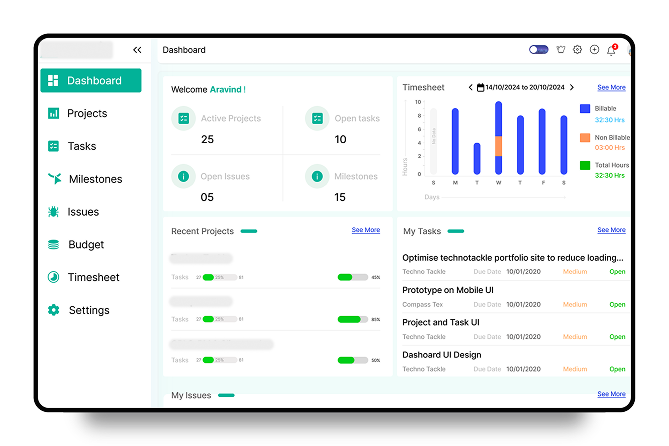
Get full visibility across all active projects. Track status, completion percentage, owners, and deadlines in one list. Manage tasks by open, closed, overdue, and assigned categories. Add projects and tasks quickly, apply filters, and export data when you need it.
Dashboard and Daily Focus
Every team member gets a personal dashboard showing their tasks for today, open issues, overdue items, and logged hours. Managers see active projects, milestones, and team-wide progress at a glance.
Task Allocation and Bench Tracking
See exactly how work is distributed across your organisation. View allocations by department or by individual, filtered by date. Identify who is over-allocated before it becomes a delivery risk. Track who is on the bench, shortly available, or fully engaged so you can assign the right people to new projects immediately.
Timesheet and Billing Tracking
Team members log hours against tasks and projects. Timesheets go through an approval workflow and are categorized as billable or non-billable. Group reports by user or project. Track rate per hour per resource.
OT Management
Log, review, and approve overtime separately from regular hours. Track OT payable vs OT paid. Export OT reports by date and project. No more OT disputes or untracked extra hours.
Issue and Milestone Tracking
Raise and track issues with priority, severity, module, reporter, and assignee fields. Link issues to milestones. Monitor open, closed, overdue, and assigned issues in one place.
Leave Management
Employees submit leave requests with type, date, and comments. Managers approve or reject from the same platform. Monthly leave reports are available without any manual compilation.
Workforce Stability Reports
Know the health of your workforce at any point. See each employee's status: long-term engaged, shortly available, or on the bench. Get a stability score by department. This is critical for resource planning in project-based companies.
Rewards and Appraisals
Run appraisal feedback cycles by department and project. Issue certificates to employees through the platform. Keep recognition structured, not ad hoc.
Configurable for Your Business
Set up portal users and client users separately. Configure themes, notifications, and timers. Enable two-factor authentication. Every setting is built around how your organization actually operates.
Weekly Task Summary
Get a project-by-project weekly view showing status, assigned developers, project manager, client name, and completion percentage. Built for weekly standups and client reporting without any manual prep.
Project Budget Tracking and Reports
Set a budget for each project and track actual hours and costs against it in real time. Project budget reports are restricted to managers, giving leadership a clear view of where projects stand financially without exposing sensitive data to the wider team. Catch overruns early. Make resourcing decisions based on numbers, not gut feel.
Your Whole Office. Right in Your Pocket.
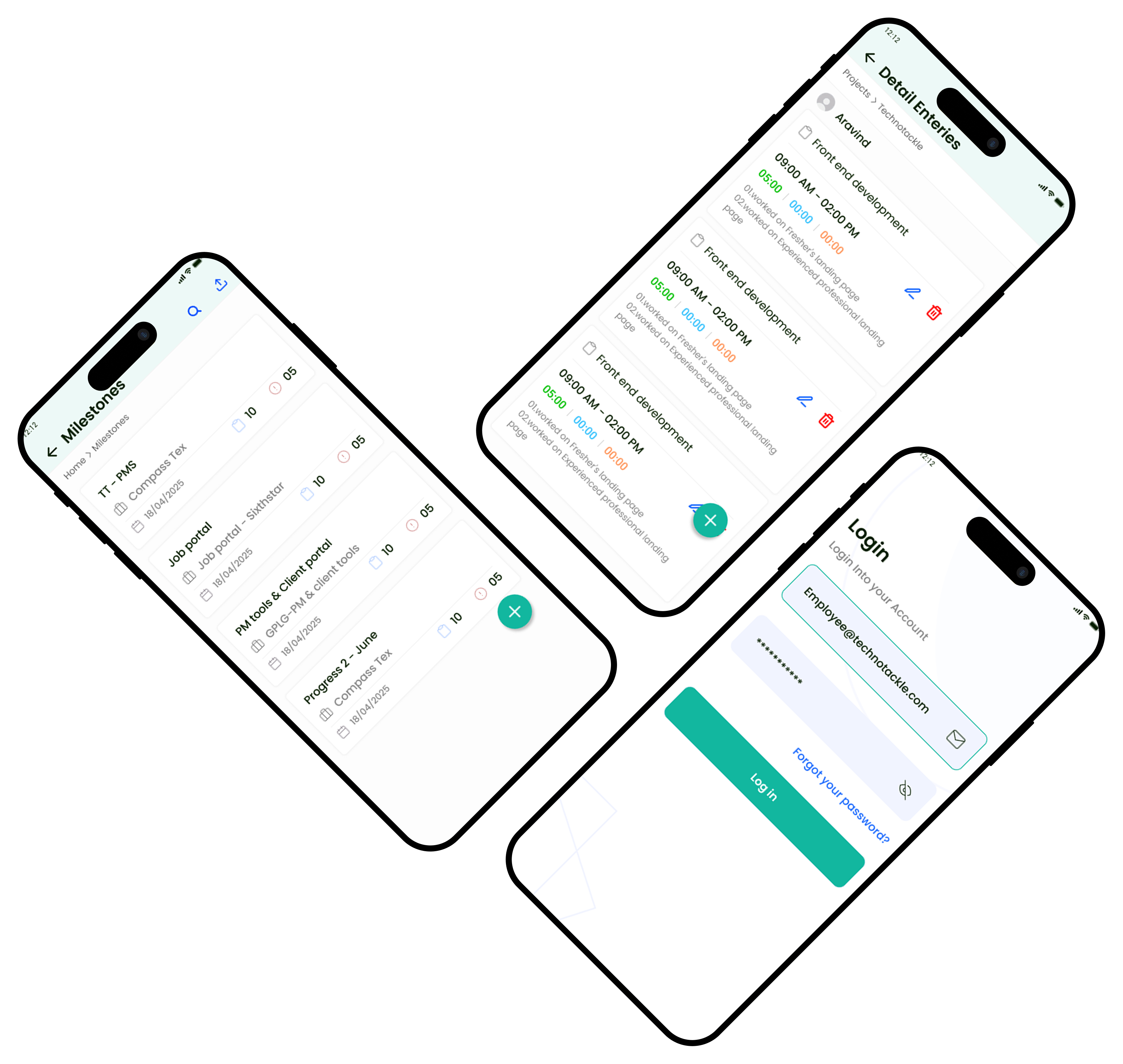
Native Android and iOS apps — plus full mobile-web access. Your team gets the operational suite on their phone: log time, update tasks, and approve leave and OT on the go. We deploy the apps directly to your team's devices, or publish them under your own App Store and Play Store accounts.
- Mobile-Optimized Dashboard — see active projects, milestones, tasks, and timesheets summarized on one unified home feed.
- Timesheet Logging & Logs — log billable hours, add detail descriptions, and manage detailed log entries instantly on the go.
- Task Board & Priority Status — view tasks, filter by priority levels (high, medium, low), and update task states from anywhere.
Why not just use Jira or Asana?
Tools like Jira, Asana, and Monday.com are built for task tracking. They are not built for operations.
With those tools, you still need separate systems for timesheet approvals, OT tracking, leave management, workforce utilization, and appraisals. That means more cost, more manual sync work, and more gaps in visibility.
Techno Tackle PMS covers all of it. One system, one data source, custom-built for your team.
Swipe horizontally to view the full comparison.
| Feature | TT PMS | Jira / Asana | Monday.com | Zoho Projects |
|---|---|---|---|---|
| Project and Task Management | Yes | Yes | Yes | Yes |
| Timesheet with Billing | Yes | Partial | Partial | Partial |
| OT Tracking and Approval | Yes | No | No | No |
| Leave Management | Yes | No | Partial | Yes |
| Bench and Utilization Tracking | Yes | No | No | No |
| Project Budget Reports | Yes | No | Partial | Partial |
| Workforce Stability Score | Yes | No | No | Yes |
| Appraisal and Rewards | Yes | No | No | Yes |
| Custom Deployment | Yes | No | No | Yes |
| Native mobile apps (Android + iOS) | Yes | Yes | Yes | Yes |
| Source-code ownership option | Yes | No | No | No |
Two ways to own it
Subscribe to the hosted version, or buy the source code and own the product outright.
We host it. Your team logs in and goes.
Launch price for our first 5 customers. Minimum 5 seats.
- ✓We host it, so there is no infrastructure to set up
- ✓Updates included
- ✓Cancel anytime
- ✓Native Android and iOS apps included
Best for: teams that want zero infrastructure and a fast start.
Book a Free DemoOne-time payment. It runs on your server.
Optional annual maintenance available.
- ✓Full source code, unlimited seats, self-hosted on your servers
- ✓Your data never leaves your infrastructure
- ✓The ₹5 lakh tier includes the native app source, so you can publish under your own store accounts
Best for: firms with data-residency rules, or that want to own the asset.
Book a Free DemoMost project-management vendors only rent you access. We give you the option to own the code outright — something Jira, Asana, Monday and Zoho do not offer.
Your workflow. Your system.
Start with a standard subscription, or have us configure TT PMS to your exact processes, roles and reporting — or take the source code and make it entirely yours. If your requirements go beyond the base product, we build the difference.
Built for teams that deliver work
Industries currently using it:
Techno Tackle PMS is a good fit if your company
- ✓Manages billable hours across multiple client projects
- ✓Bills clients based on logged hours
- ✓Needs to track bench strength for future project intake
- ✓Links performance appraisals to actual project delivery
Frequently Asked Questions
The questions buyers ask us before a demo — hosting and ownership, pricing, migration, and what happens to your data.
Can we host TT PMS on our own servers — or even own the code?
Yes — and this is where we differ from most vendors. You can subscribe to the hosted (SaaS) version, have us deploy it on your own servers, or buy the source code and own the product outright, which Jira, Asana, Monday and Zoho do not offer. If you have data-residency or security policies that require on-premise hosting, we support that.
What does TT PMS cost?
There are two ways to buy. SaaS is ₹1,500 per user/month (minimum 5 seats), with a launch price of ₹1,000 per user/month for our first five customers. Source code is a one-time ₹3 lakh for the web portal, or ₹5 lakh for web plus the native Android and iOS apps, with optional annual maintenance. Book a demo and we'll map the right option to your team.
Should we choose SaaS or the source code?
Choose SaaS if you want zero infrastructure, automatic updates and the fastest start. Choose the source code if you need the data on your own servers, want unlimited seats with no per-user fee, or want to own and extend the product yourself. As a rule of thumb, owning the code pays for itself against the subscription once you are past roughly ten users.
How do we get our existing data in?
We migrate it for you. Whether you're moving from Jira, Zoho, spreadsheets or another tool, we import your projects, tasks, users and history as part of onboarding. We did exactly this for our own company, so it's a path we know well. Migration is a supported service — we scope it and give you a clear quote after seeing your current data.
How long does it take to set up?
A standard deployment with your team structure, roles and project data takes 2 to 4 weeks. Custom workflows or integrations with your existing tools take longer. We give you a clear timeline after the first discussion.
Can we customise it for our department structure and workflows?
Yes. TT PMS is not a fixed-template tool. We map your departments, roles, reporting lines and approval workflows before configuration, and if your process differs from the base product, we build the difference. Source-code customers can also extend it themselves.
Does it support multiple clients and projects at the same time?
Yes. It's built for multi-project environments — hundreds of concurrent projects across different clients, teams and timelines, all from one platform.
How is timesheet data handled — is it linked to billing?
Hours logged against tasks are tagged billable or non-billable, with a rate per hour per resource. Project reports pull this straight through for invoicing or internal cost tracking.
Is there a mobile app?
Yes. TT PMS has native Android and iOS apps, and the full system also runs in any mobile browser. We deploy the apps to your team's devices directly; if you want them on the public App Store or Play Store, we publish them under your organisation's account. Source-code customers receive the app source too.
What happens to our data if we stop using the product?
Your data is yours. We provide a full export before any contract ends, and source-code customers keep everything on their own servers regardless. No lock-in.
What support do you provide after deployment?
Ongoing support after deployment, with tiers depending on your agreement — plus the optional annual maintenance contract for source-code customers, which covers updates. Contact us and we'll lay out the support options for your setup.
See it working for your team
Book a demo and walk through Techno Tackle PMS with our team. We will show you the full system and discuss how it fits your specific setup.
Get In touch with us
If you have any questions or concerns, we are here to help. Get in touch with us and a product expert will be happy to assist you.

